How the capping station board works in daily production
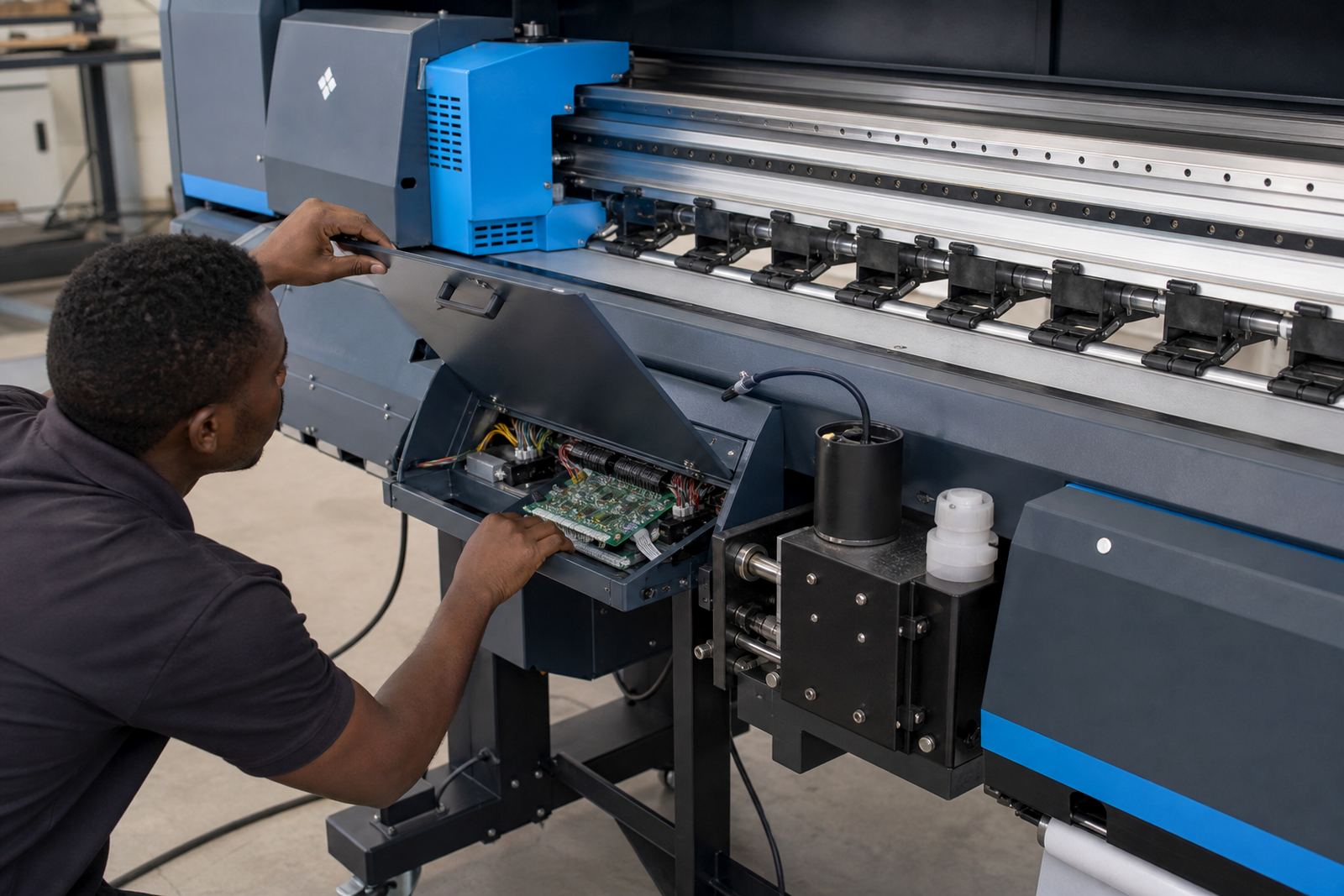
A capping station board is the control point that tells the service station when to lift, park, wipe and flush during routine maintenance. In a wide-format inkjet machine, that sequence matters because the printheads must seal properly at the cap top, excess ink must be cleared, and the carriage must move through the cycle in the correct order.
This board is used in systems where the maintenance station is driven electronically and needs steady, timed control. If the board is weak, the machine can miss cleaning steps, park poorly, or leave the heads exposed longer than planned. That often shows up as drying, blocked nozzles, unstable startup prints, and more manual cleaning than the operator should have to do.
Board formats and fitting options
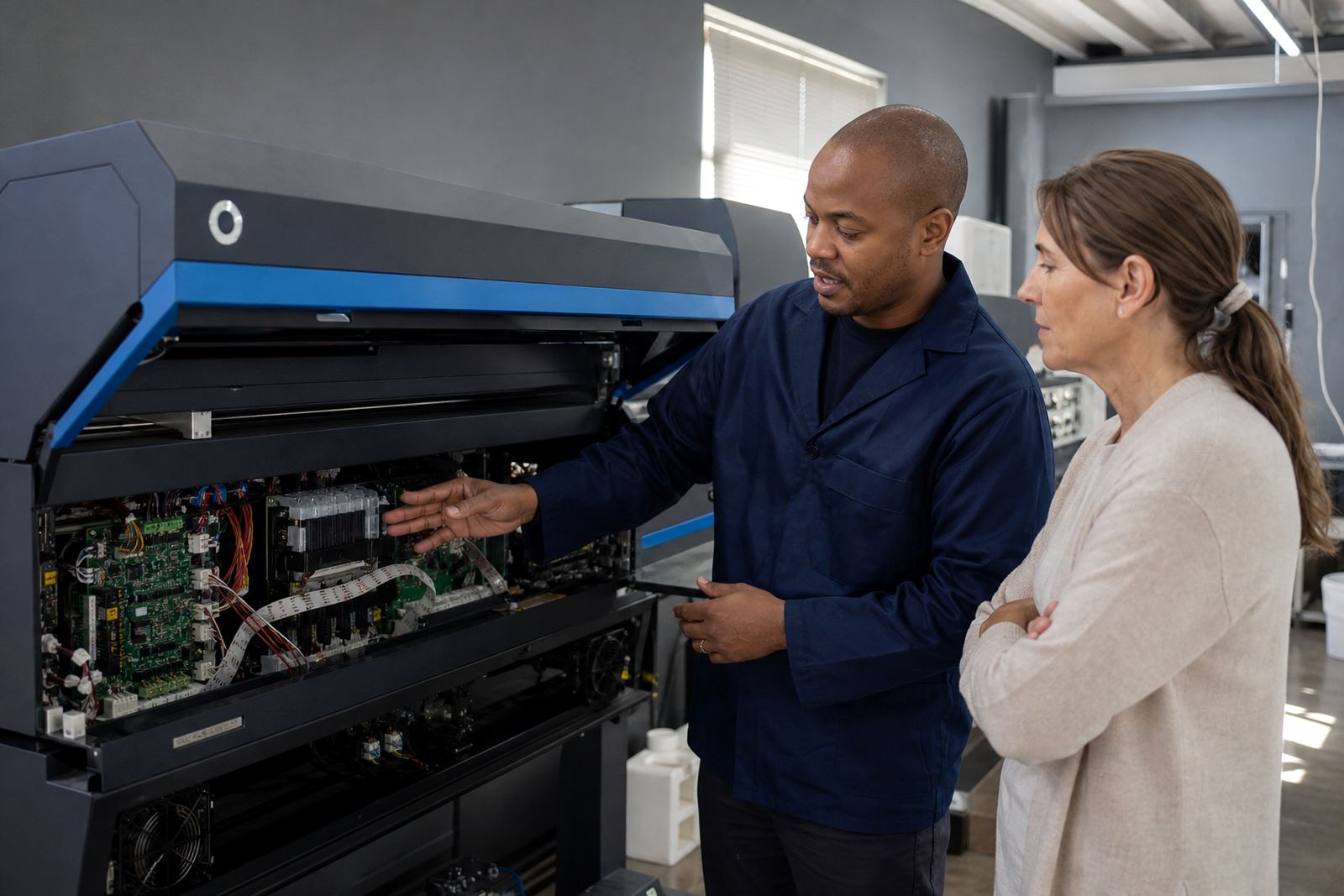
Control boards for capping stations come in different layouts, connector patterns and logic styles, depending on the printer frame and service station design. Some boards are compact single-function units that handle cap lift and wipe timing, while others sit inside a wider maintenance control set with power distribution and sensor inputs. Matching the board to the printer model and harness layout is important, because connector placement and pin mapping need to line up properly.
- Single-board service station control for basic maintenance sequences
- Multi-input boards that work with sensors, motors and limit switches
- Units with harness plugs for cap top, wiper and pump control
- Boards supplied for board replacement, repair or full service-station rebuilds
We deal with boards for wide-format inkjet printers used in signage, display work and production print rooms. The right option depends on the printer architecture, the existing cable set, and whether the machine uses a combined maintenance assembly or separate service modules.
Where this board suits real print rooms
This part suits shops that run wide-format inkjet machines on a regular production schedule, especially where the printer rests for short periods between jobs and must recover cleanly. It is common in places producing posters, vinyl graphics, exhibition panels, retail displays and large proofing work. Midrand, Johannesburg, Pretoria, Durban, Cape Town and Bloemfontein shops all deal with the same practical issue, a service station that must keep the heads in working condition without drifting out of sync.
Coastal humidity in Durban or salt-heavy air close to the coast can leave more residue around the maintenance area, while dry inland dust around Gauteng can build up on wipers and carriage paths. In both cases, the capping station board plays a part in how consistently the machine parks, cleans and prepares for the next run.
- Wide-format eco-solvent and water-based inkjet platforms
- Production printers with daily head parking and auto-clean cycles
- Machines showing uneven priming or poor cap seal behaviour
- Units where maintenance routines have become erratic after board wear
Installation, fitting and setup notes
Fitting a capping station board is not only a matter of changing the part. The service-station wiring, cap motor action, sensor feedback and cleaning pump timing all need to be checked so the board works with the rest of the machine. If the board is installed without confirming the harness path or connector seating, the maintenance sequence can fail in a way that looks like a software problem but is actually a board or wiring fault.
Our support covers remote setup where the printer can be accessed safely and the board behaviour can be verified during test cycles. For board installation, we look at the machine state, cable condition, service station movement and the way the printer exits cleaning mode. In some cases the head cap, wiper blade or pump tube should be inspected at the same time, because worn parts can place extra strain on the board and make the routine unstable.
Care that keeps the maintenance cycle steady
A capping station board lasts better when the service station stays clean and the moving parts are not fighting dried ink or rough alignment. Wiper blades should not be allowed to harden, cap tops must seal properly, and the pump path should stay clear so the board is not driving against a blocked routine. Regular preventive maintenance helps the machine keep a predictable cycle, which matters when jobs are tight and reprints are costly.
- Check for ink build-up around the cap and wipe area
- Inspect connectors for looseness, corrosion or heat marks
- Keep the service station dry during cleaning and service work
- Test the parking and cleaning cycle after any board swap
- Confirm that the pump path is moving ink away properly
On older printers, a board that has been overheated or exposed to ink splash may still function for a while, but the cleaning rhythm can become unreliable. That is when fault finding matters, because a maintenance issue can hide behind what looks like a print quality problem.
Order details to confirm before the board ships
To match the correct capping station board, the printer model, service station version and connector style must be confirmed carefully. We also need to know whether the machine uses a separate cap lift motor, a shared maintenance board, or a service assembly with integrated feedback points. A photo of the existing board, the cable plugs and the service-station label helps a lot when checking compatibility.
- Printer make and model
- Board part number or a clear photo of the old board
- Connector count and plug orientation
- Whether the system uses one station or multiple stations
- Any fault note, such as weak parking, failed cleaning or poor cap seal
- Whether the job is board replacement, repair or full maintenance rebuild
For shops in Midrand, Johannesburg, Pretoria, Durban, Cape Town, Bloemfontein and the wider East Rand or West Rand, remote support is available for setup checks, workflow alignment and board fault tracing. We can also assist with printhead driver setup, colour profile setup, queue workflow design and preventive maintenance around the same machine if the service station issue is part of a wider production fault.
Key facts
| Product type | Capping station control board for wide-format inkjet printers |
|---|---|
| Function | Controls cap lift, wiping and cleaning routines |
| Typical use | Routine maintenance, parking cycles and head recovery |
| Compatibility | Model-specific, based on connector layout and service-station design |
| Installation | Board fitting, harness check, sensor check and cycle testing |
| Support area | Midrand, Sandton, Tshwane, Durban, Cape Town and Bloemfontein |